
Complete and free AutoCAD courses: learn from scratch and master 2D and 3D projects.
Complete and free AutoCAD courses are an excellent opportunity for those who want to learn how to create technical drawings, develop professional projects, and master one of the best-known tools in the fields of architecture, engineering, and design.
Advertisements
And the best part is that you don't need to spend a fortune to get started! Nowadays, there are platforms that offer online classes, practical exercises, and educational materials to study directly from your computer, at your own pace.
AutoCAD, developed by Autodesk, is software used to create two-dimensional (2D) technical drawings and three-dimensional (3D) models.
With it, it is possible to create floor plans, construction projects, mechanical drawings, room layouts, and various other activities.
Therefore, learning how to use these tools can be a valuable asset for those seeking new professional opportunities or wishing to improve their skills.
Advertisements
Furthermore, one of the great advantages of online courses is the freedom to study whenever you want.
You can start by learning basic commands, such as creating lines, circles, and rectangles, and then move on to more complete tools, including dimensions, layers, blocks, and 3D modeling.
Even those who have never used a technical drawing program can start from scratch, as long as they are dedicated and practice the content presented in the lessons.
With that in mind, we've selected 7 platforms with free courses, lessons, and materials for learning AutoCAD, ranging from content for beginners to more advanced training.
Some also offer certificates, although issuance may depend on payment or specific requirements.
Next, you will learn about the characteristics of each option, discover what you can learn, and understand how to start your studies without complication.
Autodesk Learn – Learn AutoCAD directly from the developer.
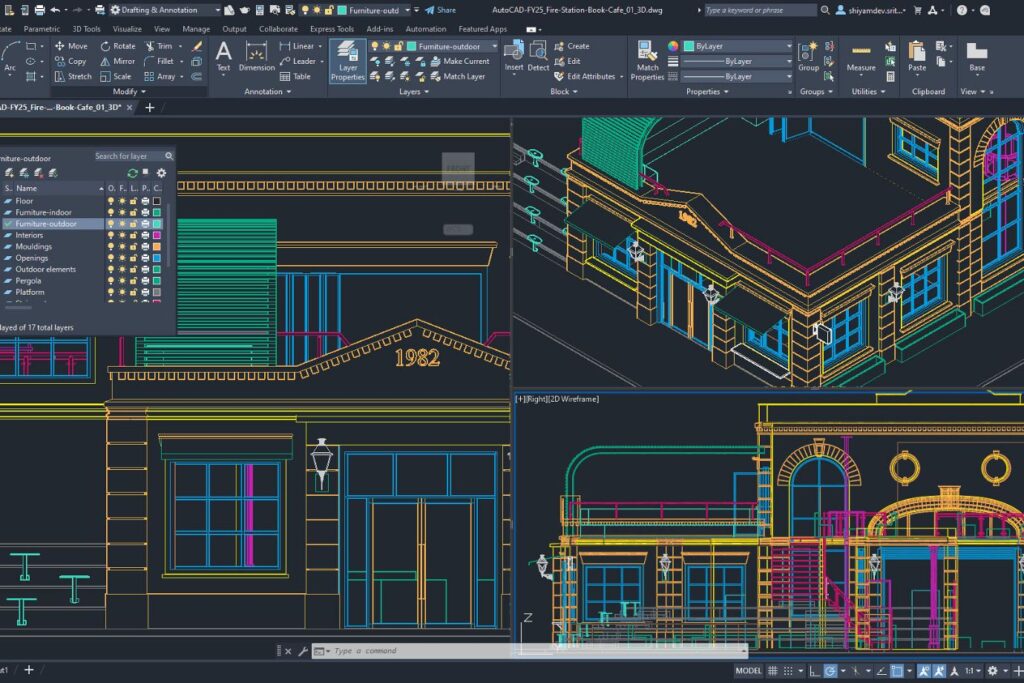
One of the best ways to get started is by using the materials provided by Autodesk itself, the company responsible for AutoCAD.
The Autodesk Learn platform brings together tutorials, educational content, and exercises that help students understand how the program works.
Since the material comes directly from the developer, it's a particularly interesting option for learning the commands and getting to know the official features of the software.
The content covers different levels of knowledge, from beginner steps to more specific resources.
Initially, you can learn how to navigate the interface, configure files, use drawing tools, and modify objects.
Later, it is possible to explore topics such as project organization, dimensioning, blocks, note-taking, and preparing drawings for printing—skills that are frequently used in everyday professional life.
Another positive aspect is the possibility of studying with materials organized by subject. This makes life much easier for beginners, since it's not necessary to try to learn all the tools at once.
In addition, tutorials can serve as reference material when questions arise during the development of a project.
It's important to remember that free access to educational materials does not mean that the commercial license for AutoCAD is free.
To get started, simply visit the official Autodesk learning page and search for content related to AutoCAD.
Choose an introductory tutorial, follow the instructions, and try to reproduce the examples in the program, if you have access to it.
In this way, you can transform theory into practice and develop your skills gradually.
How to start studying with Autodesk Learn:
- Access Autodesk Learn.
- Look for AutoCAD materials.
- Select a tutorial appropriate for your level.
- Follow the explanations and examples provided.
- Practice the commands and move on to more comprehensive content.
Alison – Online AutoCAD courses with flexible learning.
Alison is an online education platform that offers free courses in various areas, including technical drawing and CAD tools.
For those looking for complete and free AutoCAD courses, this can be an interesting alternative, mainly because it allows for organized study, with content divided into modules and learning assessments.
Depending on the chosen course, classes may cover fundamental concepts of computer-aided design, creation and editing tools, organization of elements, and project development.
In addition, some training programs explore practical applications related to engineering, construction, and design.
In this way, the student is able to understand not only how to use certain commands, but also in which situations they can be applied.
One interesting feature of Alison is the ability to track your progress in lessons. This way, you can identify which topics you've already studied and which still need attention.
Access to the free courses does not necessarily require payment of a registration fee, but additional services, such as official platform certificates, may be charged separately.
To begin, you need to create a free account and search for courses related to AutoCAD or CAD.
Next, choose a course that matches your level of knowledge and follow the available classes.
A good tip is to keep a notebook with the main commands presented, as this helps a lot when developing your own drawings.
How to enroll in a course at Alison:
- Enter Alison.
- Create your account for free.
- Search for “AutoCAD” or “CAD”.
- Choose a course available in the catalog.
- Start the modules and complete the proposed activities.
- Please check the terms and conditions if you are interested in obtaining a certificate.

Udemy – Find free AutoCAD lessons for beginners
Udemy is well known for offering online courses in technology, programming, design, and various other areas.
Among the available content, you can also find training related to AutoCAD. Although many courses are paid, the platform may offer free options that teach basic tools and important concepts of technical drawing.
One of the advantages is the variety of instructors and teaching styles. While some courses offer more straightforward explanations of the commands, others use practical examples to show how to create drawings and organize projects.
This allows you to choose a format that best suits your learning style. However, it's important to check the description of each training course, as not all free courses are comprehensive or include advanced content.
Additionally, videos can be interesting for those who prefer to follow the process visually. You observe how the instructor uses a particular tool and then try to repeat the movements in the software.
Topics that may be covered include creating lines, using coordinates, editing commands, organizing layers, and preparing drawings.
Therefore, Udemy can work very well as a complement to other educational materials.
To find a free option, access the platform and search for AutoCAD. Then, apply the free price filter, when available, and check the class schedule.
Before you begin, it's also worth noting the language, duration, and level indicated by the instructor. This way, you avoid choosing a training program that is too advanced for your current knowledge.
How to find free courses on Udemy:
- Access AutoCAD courses on Udemy.
- Search for the free courses filter.
- Check the program content for each option.
- Choose a training course for beginners or intermediate students.
- Sign up for free when the option becomes available.
- Follow the video lessons and practice the exercises.
myCADsite – Free AutoCAD course with practical exercises
myCADsite is a particularly interesting platform for those who want to learn AutoCAD in a structured way, without having to invest in expensive courses.
The website offers a series of free lessons that begin with the fundamentals of the program and progress to more complex features.
Unlike platforms that only present isolated videos, myCADsite organizes learning into levels, allowing students to develop their skills progressively.
Key topics include 2D drawing commands, coordinate systems, object editing, layer organization, and 3D modeling concepts.
In addition, the lessons provide examples that help to understand how the tools work in practice.
This is important because learning AutoCAD isn't just about memorizing commands, but knowing when and how to use them during the creation of a technical project.
Another distinguishing feature is the exercises and quizzes that allow users to review the topics studied. The platform also offers explanatory videos to complement the written tutorials.
In this way, anyone who has difficulty with a particular command can follow the demonstration and repeat the procedure as many times as needed.
The lessons available on the website can be accessed for free, while the optional package to download the complete material has a charge.
To get the most out of this course, it's best to start with the first level and only move on after understanding the fundamentals.
Try to complete the exercises without immediately looking up the answers, and try creating your own drawings using the commands you've learned.
With this routine, you develop more confidence to work with technical drawings and are able to see your progress throughout the classes.
How to study for free using myCADsite:
- Access myCADsite.
- Look for the AutoCAD tutorials section.
- Start with the basic level lessons.
- Read the explanations and watch the available videos.
- Solve the exercises and quizzes.
- Move on to the intermediate and advanced content.
SourceCAD – Learn AutoCAD with lessons focused on real-world projects.
SourceCAD is another alternative for those who want to learn technical drawing with a more hands-on approach.
The platform offers training related to CAD tools, including content on AutoCAD.
One of the site's goals is to bring learning closer to situations encountered in professional projects, which is quite useful for those who intend to work in architecture, engineering, or mechanical design.
Introductory materials can help students understand how to use commands, organize drawings, and improve their productivity.
In addition, the platform works with concepts that are important for those who want to develop projects with greater precision.
When following the lessons, it's worth paying attention to tools like Line, Polyline, Offset, Trim, Extend, and Dimension, as these commands frequently appear in the creation and editing of technical drawings.
One advantage of SourceCAD is that there are free courses to get you started, without needing to provide credit card information.
However, the platform also offers paid training courses, so it's important to check what content is included in the free access.
Nevertheless, introductory materials can be quite useful to complement other complete and free AutoCAD courses, especially when the goal is to reinforce knowledge and practice different techniques.
To begin, go to the official website and look for the free training courses available. Choose content that matches your skill level and follow the instructions provided.
Whenever you learn a new tool, try using it in a small project. For example, you can start by drawing a simple mechanical part or a floor plan with walls, doors, and windows. This way, the knowledge is no longer just theoretical.
How to get started with SourceCAD:
- Access SourceCAD.
- Look for the free courses section.
- Choose an introductory AutoCAD training course.
- Register if prompted.
- Follow the lessons and reproduce the examples.
- Use the exercises to improve your skills.
YouTube – Free AutoCAD 2D and 3D courses in video lessons.
YouTube can also be an excellent option for those who want to learn AutoCAD without paying for lessons.
The platform brings together various educational channels that teach everything from basic commands to more advanced techniques in technical drawing and three-dimensional modeling.
The key difference is the ability to visually follow each procedure, observing exactly how the instructor uses the tools during the creation of a project.
Among the channels worth checking out are CAD in Black, CAD CAM Tutorials, and educational content from Autodesk.
These materials can help you understand drawing tools, object editing, dimensions, layers, and different project creation methods.
In addition, there are videos dedicated to 3D modeling exercises, which is interesting for those who already master two-dimensional drawing and wish to develop more advanced skills.
Another advantage is that you can pause, rewind, and repeat the lessons as many times as you want. This makes learning commands that require more attention much easier.
However, to find a truly organized training program, look for playlists with lessons in sequence, starting from the beginner level.
A comprehensive playlist is often more useful than watching random videos because it allows you to build a foundation before moving on to more complex tools.
To get the most out of YouTube courses, set aside a specific time to study and keep AutoCAD open while you follow the explanations, if you have access to the program.
After watching a lesson, try to reproduce the exercise without watching the video. This practice helps to memorize the commands and develop autonomy, two important skills for those who want to use the software in their own projects.
How to find free courses on YouTube:
- Access YouTube.
- Search for “AutoCAD Complete Course for Beginners”.
- For content in Spanish, search for “Curso completo de AutoCAD desde cero”.
- Choose a playlist with organized lessons.
- Start with the fundamentals of 2D drawing.
- Move on to 3D design and modeling exercises.
Autodesk AutoCAD Foundations – Learn with official step-by-step tutorials.
AutoCAD Foundations is an official Autodesk educational resource aimed at those who want to understand the fundamentals of the program.
It presents introductory content and exercises that explain how to use essential AutoCAD tools.
Therefore, it's a great choice for students who are just starting out and need to understand how the interface works before developing more elaborate projects.
The materials include demonstrations of the tools and hands-on activities for learning the main workflows.
Topics include navigating the interface, creating drawings, and using basic resources to develop technical projects.
Furthermore, the exercises help the student understand how different tools can work together in creating a drawing, rather than learning each command in isolation.
One of the advantages is that the tutorials are part of the official AutoCAD documentation, allowing you to consult information directly from the developer. The Foundations material is available in English, but can be translated using browser features.
Access to the documentation is free, although using the software to follow the exercises requires a valid license or other authorized access method.
To begin, go to the AutoCAD Foundations page and explore the introductory content. First, familiarize yourself with the interface and identify the main tools.
Next, follow the guided exercises and try repeating the procedures. As you gain confidence, experiment with modifying the presented drawings, adding new elements and using different commands.
How to use AutoCAD Foundations:
- Access the official AutoCAD Foundations website.
- Start with the interface introduction tutorial.
- Follow these exercises for beginners.
- Practice the commands shown.
- Review the tools whenever necessary.
- Use your knowledge to create your own designs.
Start your free AutoCAD course today!
Learning AutoCAD may seem complicated at first, especially for those who have never worked with technical drawing.
However, with the right materials and a little dedication, it's possible to understand the fundamentals and gradually advance to more elaborate projects.
The complete and free AutoCAD courses presented in this article offer different ways to study, including video lessons, official tutorials, exercises, and content organized by knowledge level.
If you're starting from scratch, a good strategy is to use the materials from Autodesk Learn or AutoCAD Foundations to familiarize yourself with the interface and essential commands.
Then, it's worth complementing your studies with platforms like Alison, myCADsite, and SourceCAD. YouTube can also be very helpful when you have a specific question or when you want to follow the creation of a complete project from start to finish.
It's also important to understand the difference between studying for free and using the software without paying.
Autodesk offers free educational access to AutoCAD for eligible students and educators, typically for one year, with the possibility of renewal as long as the requirements are met.
This access is intended exclusively for educational activities and cannot be used for commercial purposes. Therefore, it is advisable to consult the official terms and conditions before requesting a license.
Now that you know different learning options, simply choose the one that best suits your goals and get started.
It's not necessary to master all the tools in the first few lessons. The most important thing is to keep practicing, review the commands, and develop increasingly complete projects.
With dedication and good, free resources, you can build a solid foundation in AutoCAD 2D and 3D and prepare yourself for new professional challenges.
